Progressus Quick Guide to Timesheet Entry and Approval
This Quick Guide is your go-to resource for everything related to entering or approving time in Progressus. Whether you're doing Timesheet Entry, Mobile Time Entry, Outlook Time Entry, Time Journal Entry, or want to learn how to approve time entry, you'll find all the essential information here — including helpful training videos and step-by-step instructions. The Quick Guide is designed to make your experience smoother and more efficient, all in one convenient place.
Timesheet Entry Overview
Time Entry in Progressus is the core process employees use to record the hours they spend working on Projects, Tasks, or internal activities. Each entry includes key details such as the Project, Task, and number of Hours. This creates a clear, auditable record of all time spent throughout the Project lifecycle.
This is the full workflow for Timesheet entry, approval, and posting, if all the Timesheet features are enabled.
- Create Timesheet Periods
- Enter and submit Timesheets
- View Timesheet Status
- Approve, Reject, or Reopen Timesheets
- Post Timesheets
Enter Time
Create Timesheet Periods
| Option | Description | Link |
|---|---|---|
| Create Timesheet Periods (required for Timesheet Entry) | This article explains how to create and manage Time Periods in Progressus. It walks you through defining the dates for time entries. | Create Timesheet Periods |
Enter and Submit Timesheets
Progressus offers two primary options for entering Timesheets. Additionally, users can log their time from various places within the system.
- Timesheet Entry: We offer two Timesheet options in Progressus:
| Option | Description | Link |
|---|---|---|
| Regular Timesheet | This is the default option and likely the one you are currently using. | Enter time using Timesheet Entry |
| Modern Timesheet | Similar to the Regular Timesheet but with an alternative look and feel. | Modern Timesheet |
Entering Time
| Topic | Help link |
|---|---|
| Enter Time Using Timesheet Entry |
Enter Time Using Timesheet Entry |
| Enter Invoice Comments on a Timesheet | How to Enter Invoice Comments on a Timesheet |
| How to Enter Overtime in Regular or Modern Timesheets | How to Enter Overtime in Regular or Modern Timesheets |
| How to Enter Time for Another User | How to Enter Time for Another User |
| How Work Type Affects Timesheets | How Work Type Affects Timesheets |
| How to Use Hour Bank feature | How to Use Hour Bank feature |
| How to Reuse Timesheet Lines in Other Timesheets | How to Reuse Timesheet Lines in Other Timesheets |
| How to Reopen a Timesheet | How to Reopen a Timesheet |
Additional Options for Creating Time Entries in Progressus
| Option | Description | Link |
|---|---|---|
| Time Journal |
This article explains how the Time Journal allows users to create, edit, and post time‑entry batches specific to Project or Resource usage. It supports both manual entry and importing Timesheet data from Excel, offering flexibility for different workflows. Users can set up journal batches, complete required fields such as Posting Dates and Project/Task Numbers, and then post entries to update the General Ledger or Project records. |
Time Journal |
| Outlook Integration | This feature uses Progressus Timesheets but provides an Outlook interface for entering time. See the following resources for more information: | |
| - Outlook Integration for Progressus (YouTube video) | ||
| - Outlook Add-in for Progressus | ||
| - Time Entry in Outlook | ||
| Mobile Time Entry | This article covers how the Progressus Mobile App allows time to be entered from mobile devices. View the video on Mobile Expense Entry to understand how the mobile interface works with Progressus. Mobile Time Entry works in a similar way to Mobile Expense Entry. | Mobile Expense Entry App (YouTube video) |
| Integrations to Create Time | ||
| - Pryme Global: Time Tracking Software | Pryme Time (YouTube video) | |
| - API's: Progressus provides APIs that deliver the ability to bring data from other systems into Timesheets or Journals. For more information, see: | ||
| - | - Progressus DevOps/Jira Integration | Progressus DevOps/Jira Integration |
| - Introduction to JIRA/DevOps APIs available in Progressus | Introduction to JIRA/DevOps APIs available in Progressus |
Reusing Timesheet Lines
| Option | Description | Link |
|---|---|---|
| How to Reuse Timesheet Lines in Other Timesheets |
This article describes how the Reuse Timesheet Lines feature streamlines entry by allowing users to copy previously entered time lines when creating new Timesheets. This reduces manual work by reusing existing Project/Task combinations and their related details. It supports faster, more consistent time entry across periods as part of Progressus’ overall Timesheet Entry functionality. |
How to Reuse Timesheet Lines in Other Timesheets |
View Timesheet Status
| Option | Description | Link |
|---|---|---|
| Time and Expense Entry | The Role Center provides information on the Current Timesheet, Open Timesheets, and Timesheets Due to Close, helping users manage their time entries effectively. | Role Center > Activities |
Approve, Reject, or Reopen Timesheets
| Topic | Description | Link |
|---|---|---|
| Timesheet Approval Overview |
This article explains how Progressus manages the review and approval of submitted Timesheets. Before using Timesheets, organizations define whether approval is required and which roles must approve them—such as the Project Manager/Person Responsible, Line Manager or Line Manager 2, or a Project Executive. These approval rules are controlled through Timesheet Configuration Codes, which specify if approvals are needed and designate the appropriate approvers. |
Timesheet Approval Overview |
Other
| Topic | Description | Link |
|---|---|---|
| How to post Timesheet lines in the Time Journal |
This article explains how approved Timesheet Entries are transferred into the Time Journal for posting. Progressus uses the Time Journal as part of its Project usage and billing workflow, allowing users to move recorded time into Project or Resource Journals for final posting. |
How to post Timesheet lines in the Time Journal |
| Create imported Timesheet entries in Time Journal | This article explains how users can bring externally prepared Timesheet data—such as entries from an Excel file—directly into the Time Journal for processing. | Create imported Timesheet entries in Time Journal |
| View Archived Timesheets | This article explains how to view submitted Timesheets by using Archived Timesheets. | View Archived Timesheets |
| Timesheet Entry FactBoxes | This article covers the Timesheet Entry FactBoxes. This feature provides an expanded view of key Timesheet analytics, including Timesheet Actuals displayed as Discrete, Cumulative, or Pay‑Type‑based hour summaries. It also shows detailed categories such as Forecast Earnings, High/Low Value usage, and Customer‑specific forecast hours tied to Project Tasks and Resource Forecast setups. These FactBoxes help users quickly interpret daily totals, capacity, valuation types, and forecast-driven metrics directly from the Timesheet Entry page. | Timesheet Entry FactBoxes |
Progressus BootCamp - Timesheets
The Progressus BootCamp is a free, self-paced online course designed to help you master everything from initial setup to advanced processing in Progressus. Whether you're just getting started or looking to sharpen your skills, this course offers step-by-step guidance to support your journey.
Self-Registering for Progressus BootCamp
Note
The Progressus BootCamp is hosted on the Stratos Cloud, which is part of the Velosio and Progressus ecosystem.
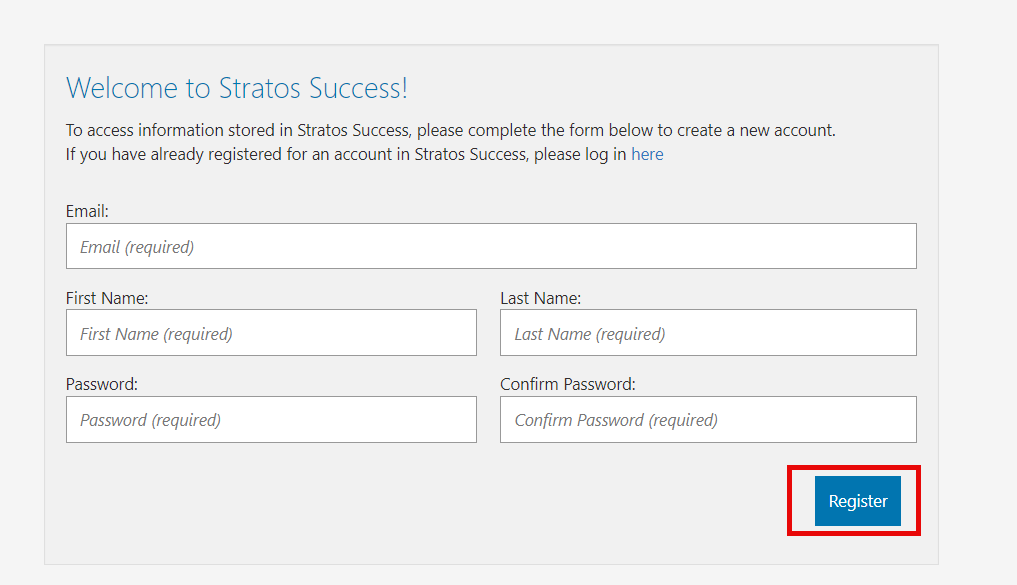
Click the following link to register: https://success.stratoscloud.net/Invite?auth=EI6wzAGXJ0PdF7Ao
Complete the form and click Register.
The Progressus BootCamp main page opens and you can begin the course from any lesson that interests you.
For Timesheet specific training, see: